A Sector Darkly Exploration & Dark Sectors
Wormholes, starmap filters, drones, runabouts, and the mystery of sectors going dark.
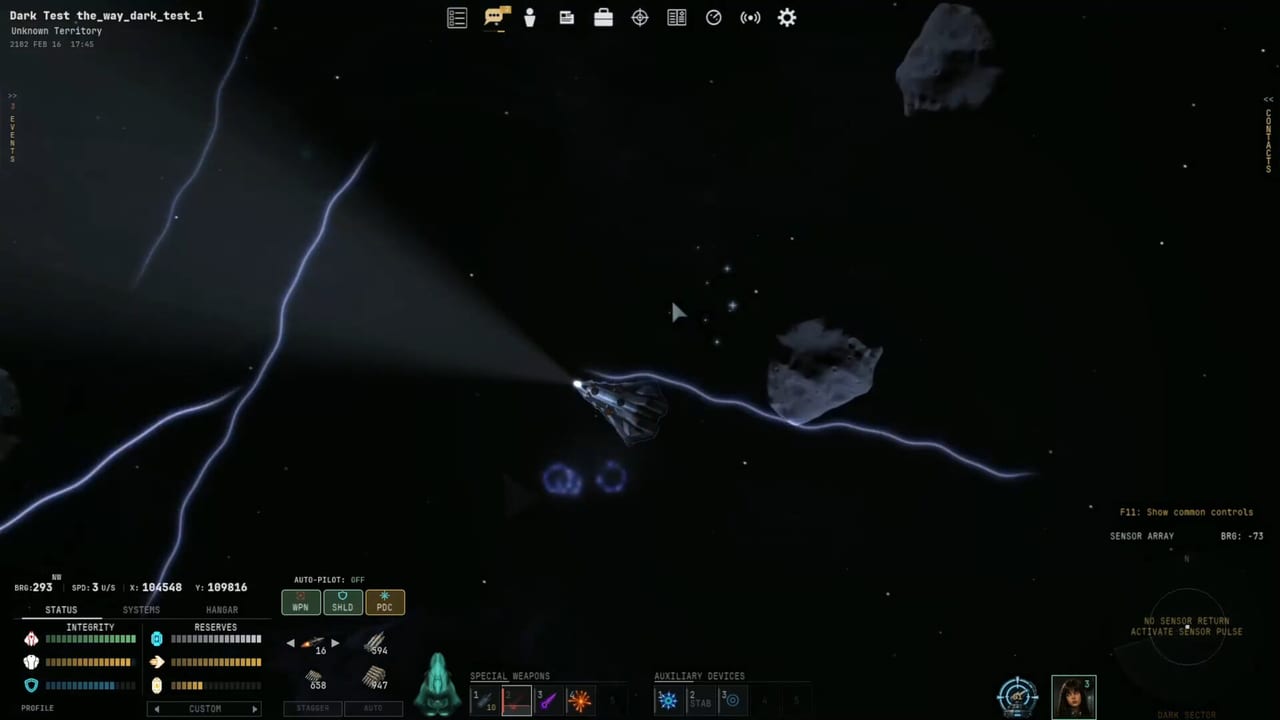
Exploration is the spine of A Sector Darkly. The game is a 2D real-time open-world space RPG where one ship and crew investigate a living galaxy while sectors mysteriously go dark. A Paradise Lost Studios plans the Windows Steam release for November 25, 2026. This guide covers wormhole types, starmap tools, strategic operations, trade filters, drones, runabouts, sensors, and how exploration feeds research — based on Steam copy, the Knowing Your Sector diary, the official site, and public previews such as the Nookrium footage embedded here. Treat specifics as pre-launch intel and refresh after Updates post-launch.
New players should finish Getting Started first. Explorers who expect fights mid-route should keep Combat and Factions nearby; builders who want payoffs from surveying should open Crafting and Research. Support craft depth lives on Drones and Runabout; profit routing pairs with Trading.
The dark-sector premise
Something is extinguishing sectors. That mystery is not only lore flavor — it is a travel and risk signal. Dark or darkening regions imply fewer friendly ports, harder resupply, and encounters you cannot casually out-DPS. Before committing a Battlecruiser through an ominous gate, ask whether your magazines, food, water, and repair drones can cover a long silent run. Corvettes and runabouts exist partly so you can probe first.
Wormholes: stable, unstable, ancient — and stabilizers
Public materials distinguish at least three wormhole experiences:
- Stable — reliable connectors for planned logistics and trade loops.
- Unstable — higher risk routes that may demand extra preparation or alternate exits.
- Ancient — rare, story-rich links that can impose special constraints, including mass limits that block oversized hulls.
Steam copy also stresses that you should stabilise wormholes before entry when a route is eligible for that treatment — do not treat every unstable icon as a casual hop. Some wormholes can only be traversed by smaller support craft: park the mothership, launch the runabout, explore, and return. Always read gate conditions on the starmap before you burn fuel toward a spectacular icon. If your Heavy Cruiser or Battlecruiser exceeds a mass cap, switch to a runabout for the transit instead of learning the hard way at the event horizon. Practical runabout patterns sit on Drones and Runabout.
Starmap filters, stations, resources, and quick jumps
The starmap is a planning surface, not a wallpaper. Everything you have discovered appears there: stargate connections, wormholes, trade flow, stations, asteroid belts, and other actors. Use filters so the map shows only what you need:
- Filter by station type when you need a specific port, not a random dock.
- Filter by resource to jump straight to belts or sites you already found — no memory guessing.
- Overlay trade views such as the Silk Road when funding fabricator work matters more than pure salvage.
- Mark alternate exits in case a sector darkens mid-journey.
- Zoom out to compare faction space before you skim contested edges.
Quick-jump tools let you select a system and then where inside it to arrive — for example, drop next to an asteroid belt, mine, and leave without multi-menu navigation. Jump range rings show what your drive can reach; better drives extend the blue. Pair map work with Trading when you are hunting profitable runs or relief requests, and with Links for developer diaries on new filter features after launch.
Strategic operations panel
While you are in a system, the strategic operations panel reports what is happening now: distress calls, pirate activity, patrols, inbound patrol counts, and status on transiting traffic (civilian ships, lost or captured ships). Distress assignments are open to NPC patrols and to you; the UI shows whether a signal already has a responder or is still waiting. Signals clear only after someone responds, so they stay on the board until investigated.
Local support stations send repair or tow craft once lanes are clear. You can tow disabled ships home, repair them yourself, or signal assistance for rewards. Marauder bases that hold captured vessels create timed rescue windows before dismantling. Clearing those bases helps secure a system, but bases can relocate. Treat the panel as a mission board and threat radar — not optional flavor.
Heat, sensors, and detection
Radar cross-section, heat, and EM signatures affect how far you detect entities — and how far they detect you. Stronger signatures push detection ranges outward. Exploration is not only “what did I find on the map”; it is also whether you arrive quiet enough to choose the engagement. When surveying contested edges or darkening sectors, think about signature discipline before you light every system and charge every thruster at once. Sensor play pairs with Combat when a contact flips from scan target to weapons-free.
Drones: mine, salvage, repair
Drones extend your reach without turning the captain into a full EVA simulator for every chore. Mining drones gather filtered belt resources, salvage drones reclaim wreck value within set radii, and repair drones stabilize armor after quadrant abuse — including self-service on the mothership. Exploration efficiency rises when drones work while you manage the starmap or reactor. Deploy across systems, move on, and collect later; low battery stops work but keeps a reserve for the return flight. Overflow that will not fit the mothership can remain on the drone until you free cargo space. Full deployment checklists live on Drones and Runabout. Combat captains should also read how repair timing fits reboot windows in Combat.
Runabouts and mass limits
Mass limits on certain wormholes make the runabout a first-class exploration tool. Park the capital hull, take the runabout through the restricted gate, survey, log Codex data, and return. Summoning the mothership is a real gate-to-gate journey, not a teleport — track it on the starmap and do not park it on a hostile trade lane. Corvettes play a similar scouting role with their own small holds — fast, limited cargo, excellent for recon before your one ship commits.
Exploration Points, Codex, and ports
Surveying is progression. Exploration Points and Codex discoveries convert into Research Points when you dock at large space ports. That means a quiet cartography session can unlock fabricator options that win later fights. Prioritize:
- New system surveys over repeat traffic lanes when you need Research Points.
- Codex entries tied to anomalies and alien contacts.
- Port stops that actually offer research conversion, not only fuel.
Full conversion and fabricator detail lives in Crafting and Research. Exploration without docking is sightseeing; exploration with research conversion is career growth.
Crew logistics on long legs
Food and water gate how far you can push. A beautiful ancient wormhole route is worthless if the crew is empty halfway. Stock supplies before dark-sector attempts, and treat every unplanned detour as a consumption event. Small-hold Corvettes feel this pressure first; heavier ships still fail if captains ignore life support while staring at positron beams.
Faction space and safe curiosity
Eleven alien races complicate the map. Aggressive V’Throni space is a different risk profile than dealing with secretive Eurians or trading near Coriantans, Noxu, or Boolooloo interests. U’Guul activity deserves extra PD magazine checks even when you only intended to scan — their missiles and torpedoes penetrate shields. Curiosity is mandatory; naivety is optional. Use Factions to decide whether a contact is a scan target, a trade opportunity, or a combat prep event.
Suggested exploration loop
- Filter the starmap for gates, stations, resources, and trade.
- Check strategic operations for distress, pirates, and patrols before you commit.
- Stock food, water, and magazines; mind heat and signature if you want a quiet approach.
- Stabilise eligible unstable wormholes; scout mass-restricted links with a Corvette or runabout.
- Quick-jump to asteroid belts or objectives when the drive range allows.
- Deploy mining/salvage drones where safe; keep repair drones ready.
- Log Exploration Points and Codex progress.
- Dock at a large port, convert into Research Points, fabricator the weak link.
- Only then commit a combat hull into contested or darkening space.
Tools and sibling guides
Return to the Guides Hub for the full list. Check System Requirements if long map sessions stutter, and Controls for map and camera binds. Ship role comparisons for scouting versus heavy escorts sit on the Tier List Hub and Ship Builds. Keep Tools bookmarked for quick reference sheets during launch week, and watch Updates when diaries add new intel tools.
Exploration in A Sector Darkly rewards captains who treat the galaxy as a system of constraints — mass, supplies, wormhole stability, signatures, and darkness — not a checklist of icons. Master those constraints and the mystery of dying sectors becomes playable instead of overwhelming.
Frequently Asked Questions
Quick answers to the most common questions.
What wormhole types exist?
Public materials describe stable, unstable, and ancient wormholes. Stabilise eligible unstable routes before entry when the game allows it. Ancient or restricted gates may impose mass limits that require a runabout.
What does the starmap show?
Gates, wormholes, trade overlays such as the Silk Road, stations, asteroid belts, and filters that help you plan routes. You can filter by station or resource and quick-jump next to belts or objectives.
What is the strategic operations panel?
A system intel feed for distress calls, pirates, patrols, inbound patrol counts, and traffic status including civilian, lost, or captured ships. Signals stay until you or a patrol responds.
Do heat and sensors matter while exploring?
Yes. Radar cross-section, heat, and EM signatures affect detection ranges for you and for contacts — quieter approaches give you more choices.
What are drones used for?
Drones support mining, salvage, and repair so you can gather resources and stabilize armor while managing travel and combat systems. See the Drones and Runabout guide for deployment details.
How does exploration unlock ship upgrades?
Exploration Points and Codex progress convert into Research Points at large space ports, which feed the ship fabricator — see Crafting and Research.
What does a sector going dark mean for travel?
It is the central mystery and a practical warning: expect harder logistics, fewer safe assumptions, and a need for stronger prep before you commit.