A Sector Darkly Controls & Interface Systems
Real-time pausable combat, weapon groups, starmap intel, drones, runabout, and engineering — systems first, binds second.
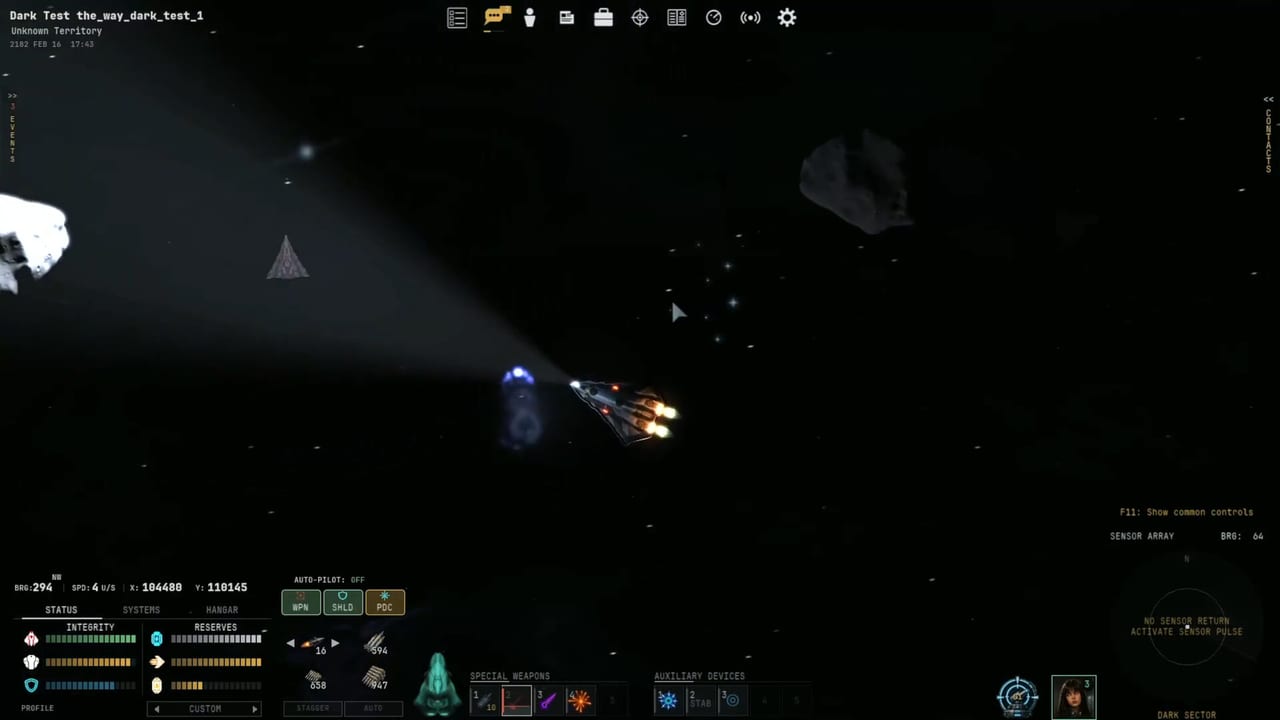
A Sector Darkly is controlled as a real-time, pausable, top-down starship RPG. You are not locked into twitch-only inputs: pause when the board state gets dense, issue orders, then resume. Exact keybinds remain subject to change between beta, Next Fest lessons, and the November 25, 2026 Steam release, so this page teaches the systems you will rebind rather than presenting a fragile absolute map. Always confirm the live Options → Keybinds screen after patches, and watch updates when diaries mention new toggles.
Use this reference beside Getting Started, combat, drones and runaboutcombat, and ship builds. Hardware questions belong on system requirements.
Core loop: real-time with pause
Movement, firing, drone work, and traffic simulation continue in real time until you pause. Pause is a first-class tool for fitting decisions mid-fight, reading strategic operations text, or retargeting weapon groups without losing the plot. New captains should practice pausing before every major heading change until group switching feels automatic.
Interface panels (crafting, engineering, starmap, drones) can clutter the screen. Pre-launch notes confirm you can control panel transparency in settings — lower opacity when you need to see the battlefield, raise it when you are deep in logistics.
Weapon groups and gunnery
Weapon groups let you fire subsets of the fit instead of dumping every mount into the reactor at once. By default, switch groups with the middle mouse button. A durable mental model:
- Energy strip group — lasers and other reactor-fed guns that peel shields without eating cargo.
- Hull breaker group — missiles, torpedoes, or ballistic spikes that finish exposed armor.
- Special group — Assault Frigate MAC-cannon, Battlecruiser positron beam, or other hull unique weapons that want deliberate facing.
Do not run weapons, shield recharge, and full thrust at maximum simultaneously unless the reactor can take it; empty banks leave you drifting. Ballistic mounts spare energy but consume magazines stored as cargo. Point defense and missiles track their own pools — reload before the fight. Developer responses during the demo period added convenience such as click-to-reload on missiles/PD, reload-all, and a battle-stations style combo (shields, weapons, and PD together) on a rebindable chord. Treat those as quality-of-life layers on top of group discipline, not a replacement for it.
Deep combat theory lives in the combat guide; fitting packages live in ship builds.
Engineering panel
Engineering is where owned components meet the hull. After you craft a blueprint item, it appears among owned components in the engineering tab. Select parts, preview the fit, then commit or revert. That preview → commit → revert loop is the safe way to experiment without bricking a working package in hostile space.
Consumables take a different path: fabricated PD ammo, missiles, and other munitions become cargo reserves, while oxygen bottles and personal weapon cells must sit in character inventory before use. Keep fabrication goals aligned with crafting and research so engineering always has parts — and cargo always has magazines — for the role you chose on the Ship Classes Hub.
Starmap and strategic filters
The starmap is your strategic overview of everything discovered while exploring: stargates, wormholes, trade flow, stations, asteroid belts, and other actors. Filters exist because the map can clutter quickly — show only what the current job needs. Search reveals known resource locations so you can jump, acquire, and move on.
The strategic operations panel summarizes the system you occupy: distress calls, pirate activity, patrols, civilian traffic, and lost or captured ships. Distress calls are open assignments for NPC patrols and for you. Info windows on the starmap give short system briefs without forcing a full panel swap; from there you can open deeper operations views or jump if your drive allows.
Learn filters early. Captains who fly blind into unfiltered noise miss Silk Road-style route highlights and waste fuel on empty hops. Pair this section with the exploration guide.
Drones and the drone panel
Support drones extend the mothership:
- Mining drones gather belt resources according to filters you set.
- Salvage drones recover parts from wrecks or search within a radius.
- Repair drones service a damaged target, including self-repair on the mothership.
The drone control panel centralizes master settings — operating radius, return behavior, and related options — but ordinary deployments should not require constant micromanagement. Drones that return with cargo that cannot fit remain loaded until you free mothership space, which is another way to stage overflow during rich salvage.
Deploy drones, continue your own tasking, and recall when the job completes. Radius mistakes strand drones; cargo mistakes strand loot.
Runabout and support craft
The runabout lets you leave the mothership and scout or work in a lighter craft while the heavy hull waits, escorts, or answers a summon. Cross-system summons are physical gate-to-gate journeys — the mothership does not teleport — so track progress on the starmap and plan time accordingly. Crewed shuttles handle planetary away missions for materials used in crafting.
Typical pattern: recon in the runabout, confirm the site, then bring the mothership’s cargo capacity only when the haul justifies the risk. This pairs naturally with Corvette-style scouting doctrine even if your main hull is a cruiser.
Practical binding habits
Because binds move, adopt habits instead of folklore:
- After every patch, open keybinds and photograph or note combat, camera, and panel chords.
- Put weapon group cycle on a mouse button you can hit while steering (middle mouse is the documented default).
- Bind pause somewhere unreachable by accident but instant under stress.
- Give battle-stations / arm-all style macros a dedicated key once they exist in your build.
- Keep starmap and operations on comfortable keys; you will open them more than vanity emotes.
Demo players asked for fewer clicks to arm weapons, shields, and PD together — the developer iterated. Expect more QOL passes after launch; re-check rather than assuming demo muscle memory forever.
Accessibility and panel comfort
Use transparency sliders so critical contacts stay visible under UI chrome. Pause when reading long alien dialogue or journal clues — the simulation can wait. If hitching coincides with panel spam, close unused windows before blaming the GPU; then verify hardware against system requirements.
Training order for new captains
- Movement + pause in a quiet system
- Weapon group switching on soft targets
- Engineering preview/commit on a known-good fit
- Starmap filters for one resource search
- Single drone deployment with tight radius
- Short runabout hop with mothership on escort/summon
Only after that stack feels boring should you attempt dark-sector edge work in a Battlecruiser broadside fit.
Related pages
- Tools hub — reference index
- System requirements — PC readiness
- Combat guide — energy and engagement
- Exploration guide — starmap in depth
- Ship builds — fitting packages
- Guides hub — full tutorials
- Updates — bind and QOL changes
Master the systems, then personalize the binds. The sector does not care which key you use — only whether your groups, drones, and headings are ready when the lights go out.
Frequently Asked Questions
Quick answers to the most common questions.
What is the default weapon group control?
Middle mouse button switches weapon groups by default. Confirm in Options after patches in case the bind changes.
Can I pause during combat?
Yes. The game is real-time and pausable. Use pause to retarget groups, read operations intel, or recover from panic without quitting the fight.
Do I need the drone panel every time I deploy?
No. The panel holds master settings such as radius and return behavior. Ordinary mining, salvage, and repair deployments should not require constant babysitting.
Will this key list stay accurate after launch?
Individual chords may change. This page prioritizes systems — groups, engineering, starmap, drones, runabout — so you can adapt quickly. Follow updates for announced QOL binds.